The Helmsman's Bridge: Building a Unified Homelab Command Deck
Why ten open-source bookmarks fall apart on your phone, and how an Astro SSR front door brought ten self-hosted apps under one calm desktop and mobile helm.
The Dutch word stuurman translates to helmsman, steersman, or ship’s mate—the person at the wheel keeping a vessel pointed toward open water while the engineers below deck tend the engine room.
When I first sketched out an internal portal for home-lab.net, I called it Cockpit. That early name is still baked into the database filename (cockpit.db) and a few service labels under the hood. At the time, it felt like the obvious choice. Every homelab operator eventually pictures a row of glowing status tiles on a dark screen.
Somewhere around day three of wiring ten live apps together, the word stopped fitting. An airplane cockpit is a cramped cluster of dials bolted inches from your knees for flying in thin air. A ship’s Bridge is open, quiet, and looking out across the horizon while the real machinery—ProxmoxProxmoxProxmox Virtual EnvironmentVirtualizationAn open-source Debian-based enterprise virtualization platform tightly coupling KVM hypervisors, LXC containers, ZFS storage, and clustered management. VE, ZFSZFSZettabyte File SystemStorageAn enterprise combined file system and logical volume manager featuring copy-on-write, data integrity checksumming, snapshots, and software RAID. pools, 10G fiber links, and Linux containers—hums along two decks below behind a closed closet door. You do not want to live in the engine room with a wrench. You just want one calm helm where you can read your mail, check a photo, or glance at the day’s schedule without fighting ten separate browser tabs.
So Cockpit became The Bridge—and over six busy days in November, it grew into a unified desktop and mobile home for ten self-hosted apps and eleven settings panels.
1. Ten Good Backends, One Bad Daily Routine
When you self-host best-of-breed open-source software instead of renting an all-in-one cloud suite, the underlying tools are genuinely great:
- Stalwart runs mail, spam filtering, and Sieve rules inside a single fast Rust binary.
- Immich indexes family photos on ZFS with local visual search.
- Seafile handles block-level file syncing and encrypted vaults.
- Monica, Radicale, Memos, Kimai, SearXNG, and LiteLLM + Ollama + Qdrant each solve one focused problem cleanly.
You get full ownership of your disks, backups, and data. What nobody mentions on a Docker Compose README is how messy that setup feels three weeks later—especially when you pull out your phone on a commuter train in the Kanagawa / Greater Tokyo area.
What you actually end up with is a tab graveyard:
- Ten mismatched interfaces: A dark-slate mail admin panel next to a bright-white PHP timesheet app, a Material photo timeline, and a decade-old contact manager, each with its own layout quirks and keyboard shortcuts.
- Ten separate auth clocks: Even behind single sign-on, different apps handle mobile redirects differently, drop deep-links after login, or expect personal tokens pasted into random forms.
- Hostile phone screens: Most self-hosted tools are built on big monitors and barely tested on a
390pxphone. Open a multi-column inbox, filter bar, or preview modal on mobile and buttons quietly vanish off the edge. - No shared alert feed: Nothing tells you in one place that a calendar invite overlaps your afternoon, a contact reminder fired in Monica, or a Kimai timer has been ticking for four hours.
- Browser-side LANLANLocal Area NetworkNetworkingA computer network interconnecting hosts, servers, and switches within a limited geographic footprint such as a residence, server room, or office building. mess: Letting a static browser app talk directly to ten internal services drags you into CORSCORSCross-Origin Resource SharingSecurityAn HTTP-header based security mechanism that allows a server to indicate any origins (domain, scheme, or port) other than its own from which a browser should permit loading resources. headers, mixed-content headaches, and APIAPIApplication Programming InterfaceDevOpsA formal contract of endpoints, protocols, and data schemas that enables distinct software services to exchange commands and state predictably. tokens sitting inside browser storage.
The backend tools were doing their job. Living across ten disconnected bookmarks was the broken part.
2. One Front Door in Astro SSR
In our split-horizon homelab plan, home-lab.net serves a lightweight static site on CloudFrontCloudFrontAmazon CloudFrontCloudAWS global content delivery network (CDN) that securely delivers data, static assets, and APIs at low latency with edge caching and Origin Access Control. and S3S3Simple Storage ServiceCloudAmazon Web Services scalable object storage offering 99.999999999% (11 9s) of data durability with fine-grained IAM policies and versioning. to the public internet, while resolving to our Proxmox host at home whenever a device sits on the LAN or connects remotely over NetBird.
For the private Bridge, I wanted that exact same fast, calm feel without shipping a heavy JavaScript framework to the browser. There is no React, Vue, or Svelte runtime anywhere in the client bundle. Instead, the Bridge runs as a server-rendered Astro 7 app on Node v25 with Tailwind CSSCSSCascading Style SheetsArchitectureThe W3C stylesheet language used to describe the layout, typography, color tokens, responsive grid geometry, and animations of HTML and SVG documents. v4:
- Server-rendered templates build every page on demand with the signed-in user’s real data already attached.
- Client-side view transitions keep jumps between Mail, Calendar, Photos, and Settings crisp without losing theme state or tearing down the shell.
- Small vanilla TypeScript modules handle menus, keyboard shortcuts, inline modals, and optimistic updates with almost zero browser overhead.
Inside Proxmox, the Bridge sits in its own unprivileged Linux container behind Caddy and Authelia (backed by LLDAP). Nothing on the internet ever touches it directly. Every request stops at Caddy first, where Authelia checks your passkey or hardware token, attaches verified identity headers, and adds a shared proxy secret so a stray container on the LAN cannot spoof another username by hitting the Bridge directly.
Before any page or API route runs, server middleware validates that proxy secret, pulls the user’s display name, mail aliases, and groups from LLDAP, and loads their saved service keys into request memory.
3. One SQLite File Instead of Another Database Server
When you build a server-side wrapper around ten apps, the reflexive enterprise habit is spinning up a fresh PostgreSQL cluster and a Redis cache just to store UI preferences, chat histories, and API keys. In a lab where we actively trimmed idle rack draw by retiring redundant servers, running two more database daemons on our home solar battery just for the front door made no sense. The engine-room apps already manage Postgres and MariaDB inside their own containers.
Because Node v25 ships node:sqlite built straight into the runtime, one local SQLite file in write-ahead logging mode handles everything with zero native C++ addon builds and zero extra background processes. It backs up cleanly alongside the rest of the container with a single snapshot command.
That file holds each person’s settings, custom 256×256 avatar, SSHSSHSecure Shell ProtocolSecurityA cryptographic network protocol (RFC 4251) operating over TCP port 22 for secure remote command-line administration, port forwarding, and SFTP file transfers over untrusted networks. keys, mail filter rules, notification states, AIAIArtificial IntelligenceAIComputer systems and neural architectures capable of reasoning, code synthesis, pattern recognition, and autonomous agentic execution. chat threads, external mail/calendar accounts, and personal service tokens. Every sensitive payload—IMAPIMAPInternet Message Access ProtocolNetworkingAn application-layer email retrieval protocol that synchronizes folders and message state bi-directionally between a mail server and multiple client devices. passwords, OAuth2OAuthOpen Authorization (OAuth 2.0)SecurityAn industry-standard authorization framework that enables third-party applications to obtain scoped, delegated access to an HTTP service via access tokens. refresh tokens, and backend API keys—is sealed on disk using AES-256-GCM encryption derived from a server-side secret key before it ever hits SQLite.
Two strict boundaries keep household accounts cleanly separated:
- Per-user scoping everywhere: Every SQLSQLStructured Query LanguageStorageThe standardized domain-specific programming language engineered for managing, querying, and updating relational databases. read, update, and deletion filters strictly by the signed-in user’s normalized identity key, and strict multi-user mode disables shared fallback tokens completely. Even document vector lookups in Qdrant stamp and filter chunks by user key so one person’s indexed PDFsPDFPortable Document FormatArchitectureAn open standard (ISO 32000) file format developed to present documents—including vector graphics, embedded fonts, and layout geometry—identically across any device or OS. never leak into another person’s AI answers.
- No secrets in the browser:
node:sqliteandnode:cryptostay strictly on the server. When you open/settings, the browser only learns whether a service key is configured, where it came from, and its last four masked characters—never the raw token itself.
4. Real Mail and Calendars Without Open Ports
Making a start page look tidy is the easy part. Making real email and calendar protocols work smoothly behind a residential fiber line takes more patience.
Our homelab sits behind a NURO Hikari optical router (double NATNATNetwork Address TranslationNetworkingA networking technique that re-maps an entire private IP address space into a public IP address by rewriting IP headers during gateway routing.) with zero inbound ports forwarded from the internet, paired with a NetBird mesh overlay so phones and laptops reach *.home-lab.net transparently on the road. Self-hosted services run happily behind that curtain—until you try linking external Google or cloud mail accounts into the unified inbox using modern OAuth2 instead of legacy app passwords.
External OAuth providers reject private .home-lab.net callback URLsURLUniform Resource LocatorNetworkingA specific type of Uniform Resource Identifier (URI) that both identifies a web resource and specifies the network protocol (e.g. https://) and hostname needed to retrieve it., and split-horizon DNSDNSDomain Name SystemNetworkingThe distributed hierarchical naming system that translates human-readable hostnames into numerical IP addresses and directs mail routing via MX records. means the host header your browser sends can change depending on whether you are on the couch or over cellular data. So the Bridge resolves its public callback origin from explicit server configuration (or verified proxy headers), pairs every sign-in attempt with a PKCE challenge and an HMAC-signed HttpOnly state cookie, and checks the returned state, cookie, signature, and signed-in user in constant time before saving anything. If a testing-mode Google token silently expires after seven days, the account flags itself for a one-click reconnect right inside Settings without losing your folder rules.
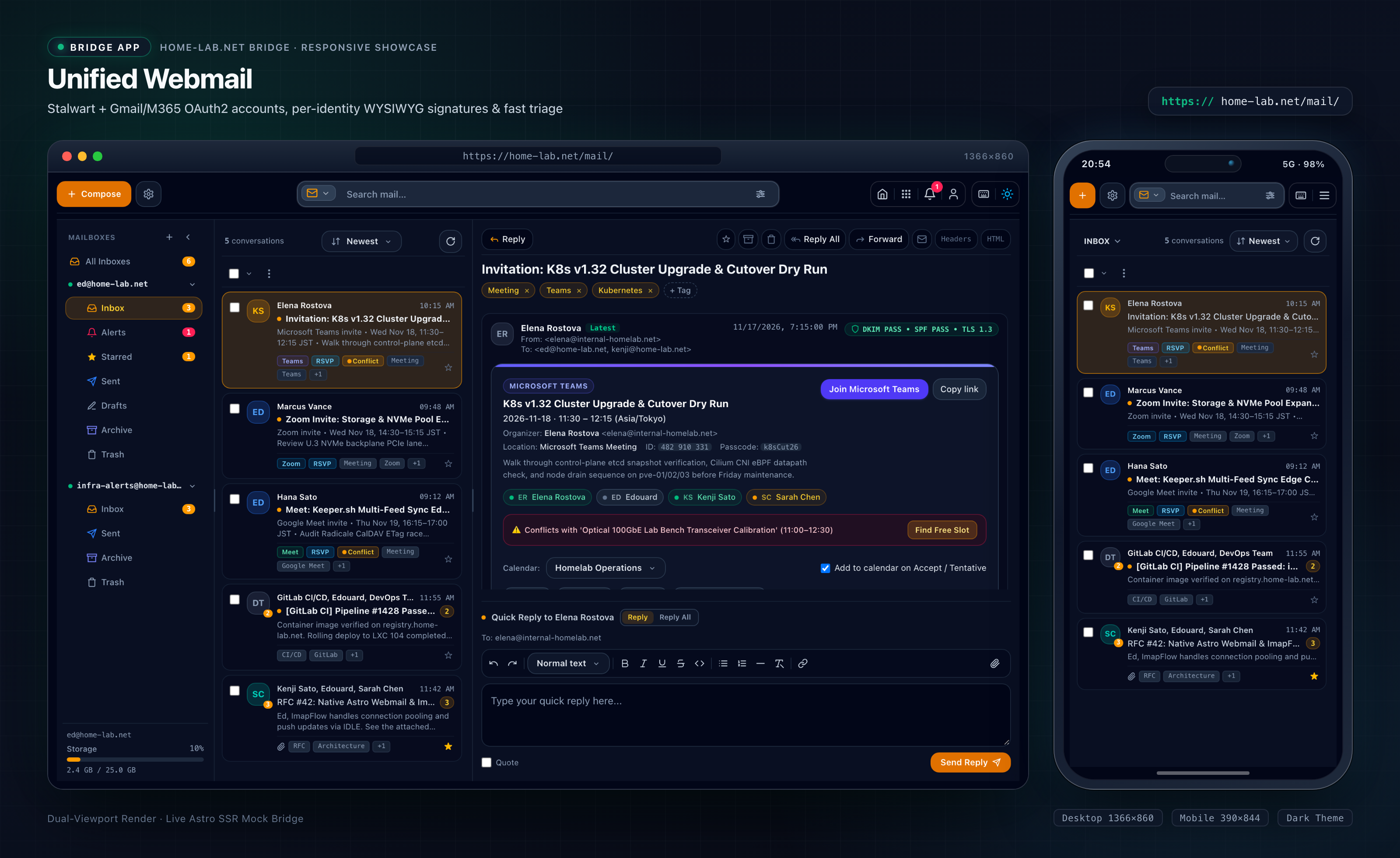
Combining Stalwart (speaking JMAP with automatic IMAP/SMTP fallback), standard IMAP servers, and cloud RESTRESTRepresentational State TransferArchitectureAn architectural style for networked hypermedia APIs that uses stateless HTTP verbs (GET, POST, PUT, DELETE) to manipulate structured resource representations. mailboxes behind one URL scheme also tripped a classic routing quirk: cloud message IDs love +, /, and = characters that break URL path parameters. Wrapping every external folder, message, and attachment identifier in a URL-safe base64 envelope keeps links uniform across every provider.
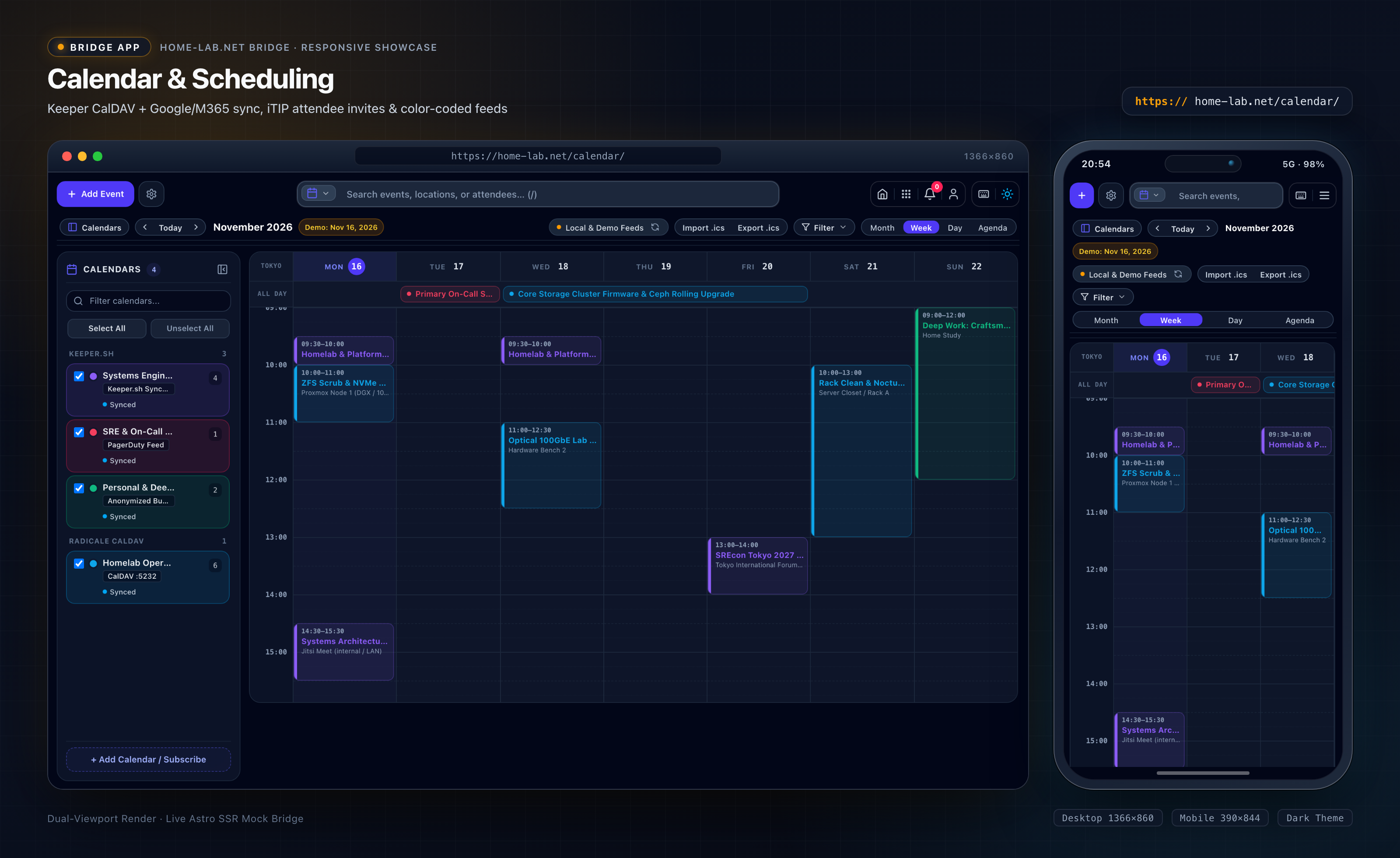
Calendars follow the same unified path across Keeper.sh, local Radicale (CalDAV), read-only Webcal feeds, and Google or external cloud accounts:
- Incoming
.icsinvites inside Webmail are parsed on the server and checked automatically against your schedule for that exact window, showing an inline conflict warning and a Find Free Slot button right above the RSVP bar. - Clicking Accept, Tentative, or Decline—or editing or cancelling a meeting in
/calendar/—builds a clean.icsinvite or cancellation and dispatches it through Stalwart without blocking your calendar update if mail delivery takes an extra second.
5. Ten Workspaces and One Settings Page
Every daily workflow inside home-lab.net now shares one header, one theme toggle, and one keyboard navigation model instead of ten unrelated bookmarks:
| Route | Workspace | What It Wraps & Does |
|---|---|---|
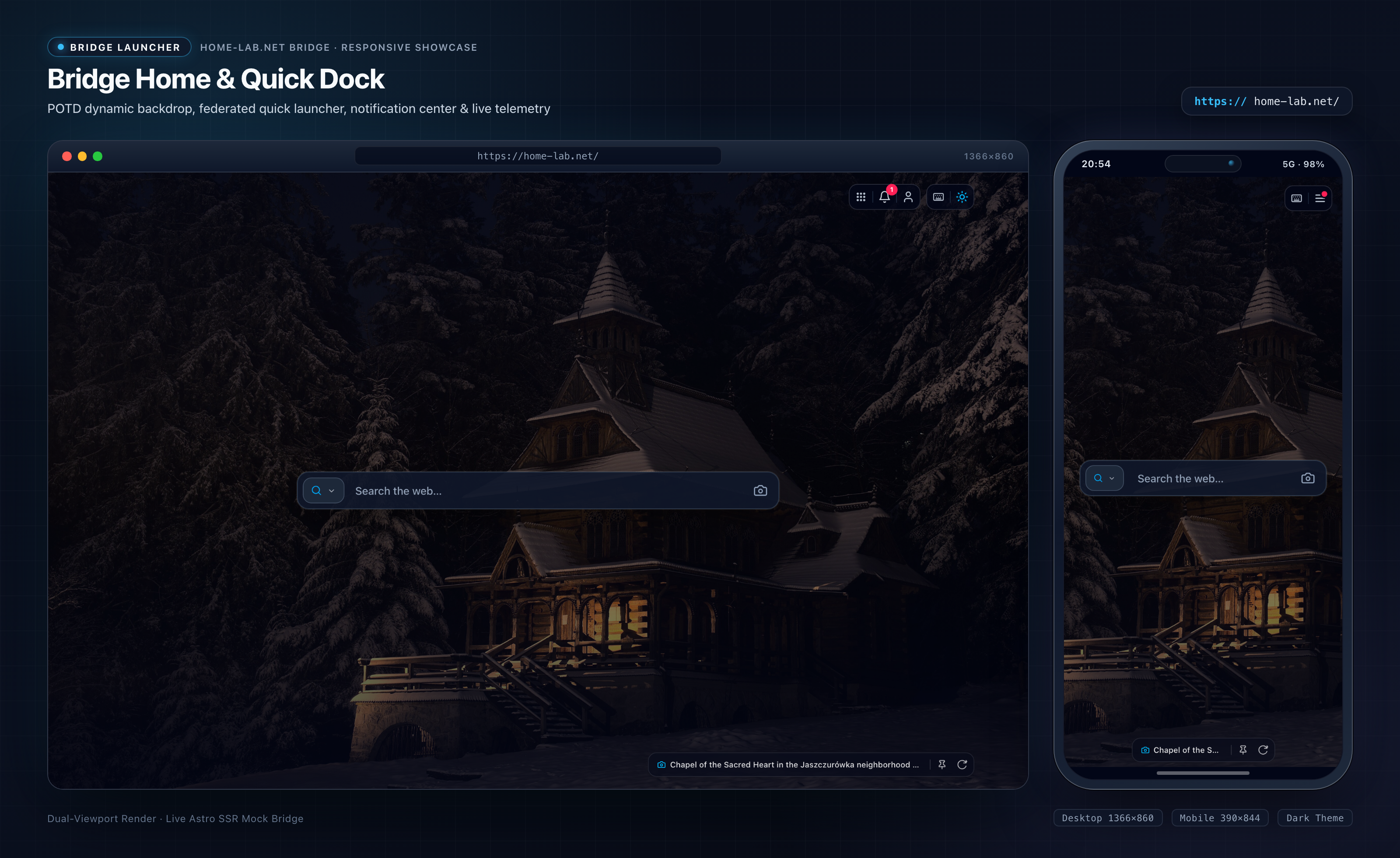
/ | Home | Daily Wikimedia Commons Picture of the Day wallpaper, !bang launcher, and 7-app notification bell |
/search/ | SearXNG | Private metasearch across web, images, news, and docs with zero tracking |
/ai/ | Ask AI | LiteLLM and local Ollama chat with Qdrant/Paperless document search, file uploads, and saved threads |
/mail/ | Webmail | Stalwart inbox alongside external IMAP and cloud accounts, Sieve rules, rich signatures, and Monica autocomplete |
/calendar/ | Calendar | Combined schedule across Keeper.sh, Radicale CalDAV, and cloud feeds with conflict checks and .ics invites |
/photos/ | Photos | Fast Immich timeline and masonry grid, smart search, and drag-and-drop uploads through the server proxy |
/files/ | Files | Seafile library browser, encrypted vault unlocking, Markdown previewer, and ZFS pool usage readouts |
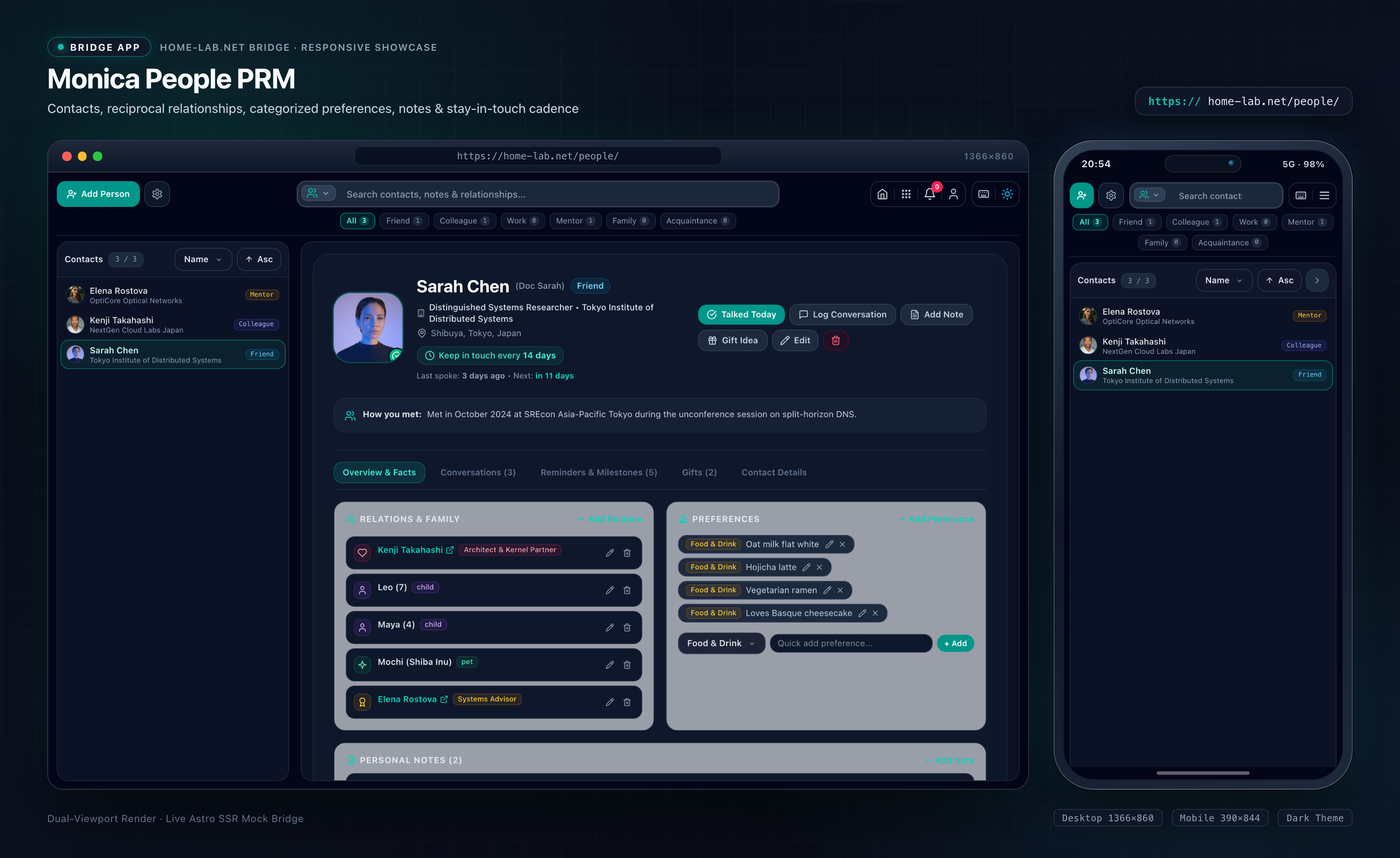
/people/ | People | Monica relationship manager for notes, family links, preferences, gifts, and keep-in-touch reminders |
/memos/ | Memos | Quick Markdown micro-notes with #tag filters, pinned checklists, and auto-save |
/time/ | Time Tracking | Kimai live stopwatch, daily and weekly targets, billable tracking, and timesheet logs |
One Notification Feed Across Seven Apps
Instead of opening seven tabs over morning coffee just to see what changed, the Bridge polls seven adapters in parallel—Mail, Calendar, Time, People, Files, Memos, and Photos—with tight per-source timeouts so a restarting container never stalls the rest of the page. Read flags, dismissals, and per-app mute toggles all save per user in SQLite.
Eleven Settings Tabs Under One Roof
Configuration lives in /settings behind a split back button that always remembers which app sent you there:
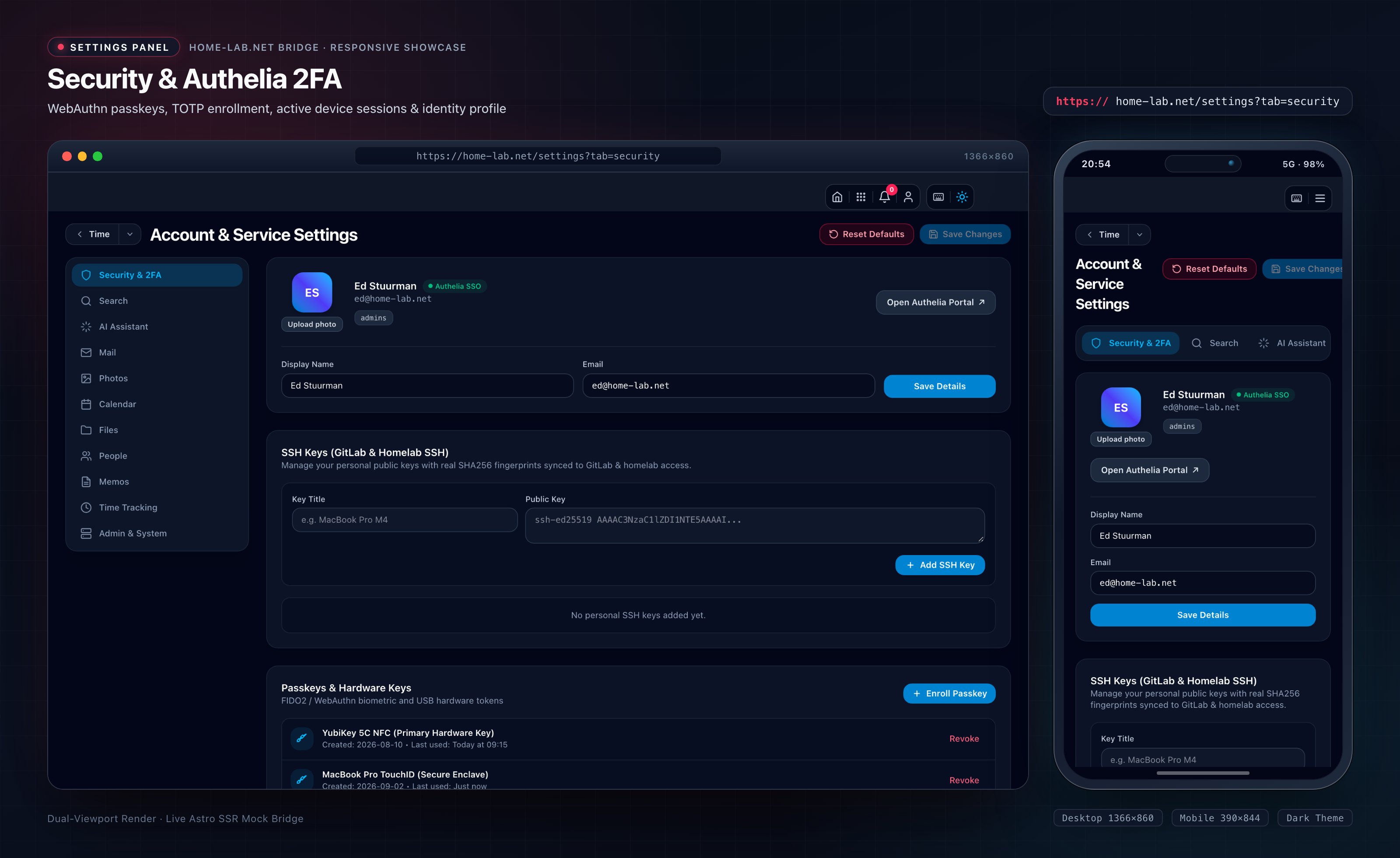
- Ten personal tabs cover Security & 2FA2FATwo-Factor AuthenticationSecurityAn identity verification control requiring two distinct authentication factors—such as a password plus a hardware security key or TOTP code—before granting access. (Authelia status, hardware passkeys, active sessions, custom avatar uploads, and SSH keys synced to GitLab), Search, AI models and prompt presets, Mail accounts/Sieve/signatures, Photos, Calendar feeds, Files, People/CardDAV, Memos, and Time Tracking billing rules.
- One admin-only tab (shown strictly to directory admins) provisions or removes accounts across LLDAP, Immich, Stalwart, and Keeper.sh in one step while minting per-user LiteLLM virtual keys with monthly spending limits—or auto-provisions missing service accounts quietly on first login.
6. Fixing What Breaks on a Phone Screen
Anyone can make a homelab UI look sharp in a 1366×860 desktop screenshot. The real test is whether you can archive three emails, check a schedule clash, and stop a timer one-handed on a 390×844 phone screen without zooming or losing buttons off the side.
Instead of saving responsive CSS for the last hour, we wired headless Chrome over the DevTools Protocol into our verification pass, snapping paired desktop (1366×860) and mobile (390×844) views of every app and settings tab. Looking at real 390px renders caught four layout bugs that static code review almost always misses:
- Growing reply boxes pushing
Sendoffscreen: In Webmail’s quick reply and signature editor, an auto-expanding rich-text box inside a fixed viewport shoved the Send Reply button straight below the fold as soon as you typed four lines. Capping the editor height with internal scrolling kept the compose bar pinned under your thumb. - Filter pills blowing out page width: Category chips in People, Kimai, and Search wrapped into awkward multi-line stacks or pushed the entire page wider than
390pxuntil constrained inside clean horizontal scroll rails. - Colliding modal toolbars: File and attachment preview modals stacked Download, Share, and Close buttons on top of long filenames at narrow widths until re-laid out with proper wrapping and breathing room.
- Notifications swallowing the mobile menu: Dumping seven apps’ worth of alerts straight into a slide-down phone drawer buried the app switcher below the fold. Keeping a single preview alert at the top and tucking per-app mute toggles inside a collapsible drawer restored instant one-tap navigation.
7. Six Days from Sketch to Daily Driver
Looking back at the git history shows how much velocity changes when you pair systems fundamentals with fast feedback:
- 270 commits landed in 6 days (
2026-11-13to2026-11-18) - 368 source files covering server adapters, Astro templates, client scripts, and shared contracts
- 20 test suites running 236 passing tests in a couple of seconds
Fast edits only stay safe if you know immediately when a refactor breaks an adapter three layers down. Waiting half a minute for Astro and Vite to compile on every backend tweak kills flow, so our test runner uses Node v25’s native TypeScript support with minimal Astro stubs and an in-memory SQLite database. Mail routing, calendar invite parsing, AES-256-GCM encryption, and notification aggregation all verify in seconds.
Just like when I switched stuurman.com to AI-assisted engineering, the real trick wasn’t dumping one giant prompt into a chat box. It was separating the blueprint cleanly—locking down types and SQL boundaries first, splitting parallel work across independent modules, and checking every change with fast unit tests and real headless Chrome screenshots.
8. The Full 21-Screen Bridge Gallery
Here is the complete visual tour across all 10 workspaces and 11 settings panels, captured straight from the live Astro SSRSSRServer-Side RenderingArchitectureA web rendering architecture where pages are dynamically generated by an application server on demand for each incoming client HTTP request. Bridge across 1366×860 desktop and 390×844 mobile viewports:
Dual-Viewport Retina Showcase
Desktop (1366×860) & Mobile (390×844) side-by-side
Wikimedia POTD wallpaper, centered launcher & 7-app notification bell
Use ← → arrow keys to navigate
Bridge Home & Quick Dock
Wikimedia POTD wallpaper, centered launcher & 7-app notification bell
Closing: A Helm Worth Using
The point of building The Bridge wasn’t to hang another decorative dashboard on a spare monitor. A homelab only earns its keep—and its overnight watts on a residential solar battery—when the tools running on it feel calm and natural to reach, whether you are sitting at a desk or standing on a train platform with one thumb free.
Down in the engine room, Proxmox, ZFS, Stalwart, Immich, and NetBird keep turning quietly out of sight. Up on the bridge, everything finally answers to one wheel.

About the author
Ed Stuurman
Senior infrastructure and reliability engineer based in Kanagawa, Japan. Focused on resilient cloud architecture with AWS and Terraform, enterprise mail migrations, Linux systems, and homelab engineering.
Contact
Thoughts or questions on this article?
Found a bug, tested a similar setup, or want to discuss the details? Drop a message below.